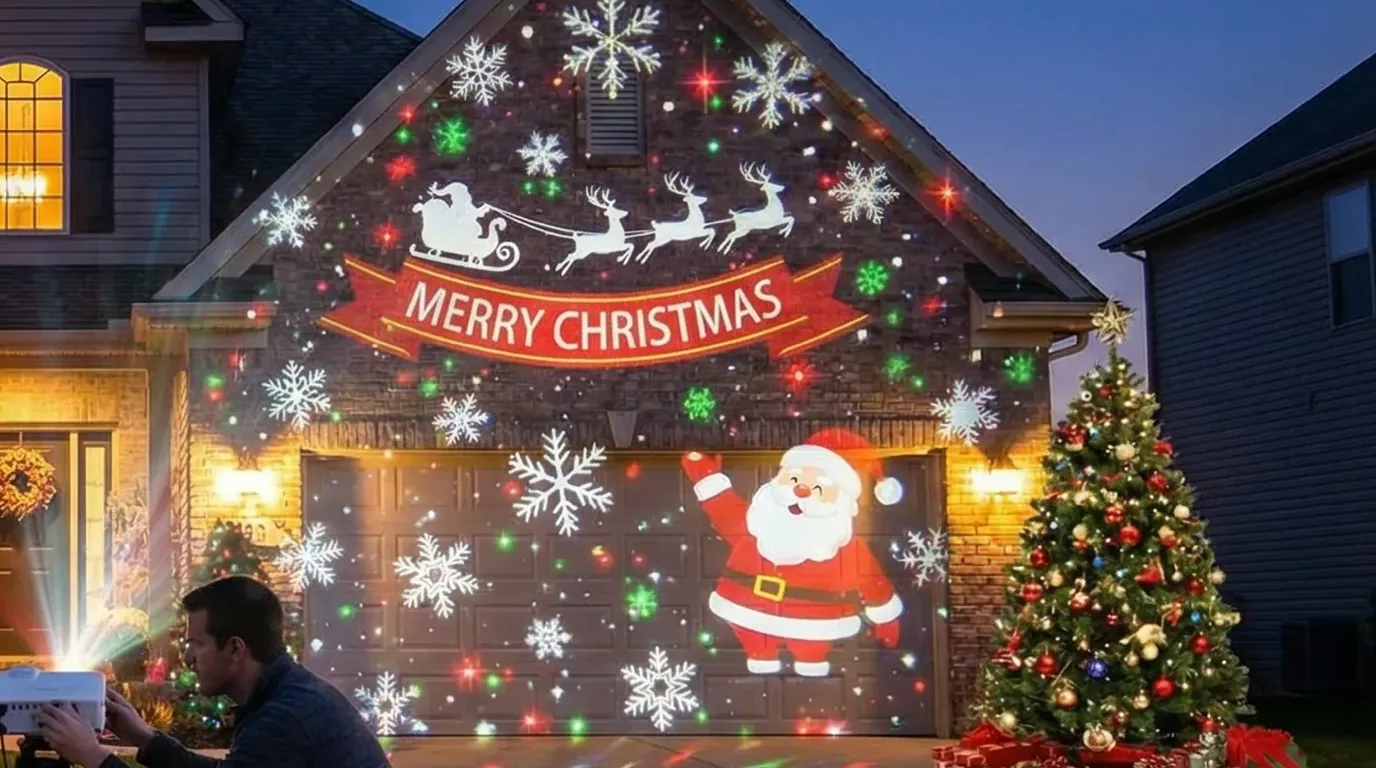
Read this before you buy anything
If the picture in your head is the whole front of the house — every window, wall and gable blended into one seamless animated canvas — this is not the tool, and this is not the guide. That look takes multiple projectors, edge-blending software and a media-server rig, and SurfaBeam does none of it: it drives one projector and one output, full stop. What one projector does brilliantly is one big flat rectangle, mapped so tightly the light stops at its edges. On most houses, that rectangle is the garage door.
Why the Garage Door Is the Best Screen on Your House
Stand at the curb and audit the facade like a projectionist. What you want is big, flat, pale, rectangular and near power, and one surface wins on all five: a single garage door runs about 2.4 m wide by 2.1 m tall, a double about 4.9 m wide, most of them are white or pale, all of them are rectangles a four-dot map fits perfectly, and there is a socket inside the garage a cord's length away. Nothing is planted in front of it, and it faces the street, which is where the audience is.
One catch nobody mentions until December: the best projector position is often the exact patch of driveway where the car parks. Decide up front — the car lives on the street for six weeks, or the projector stands off to one side and the skew gets fixed in software. The second option is fine; corner pinning exists precisely so the projector does not have to sit dead centre, and an off-centre spot near a wall is easier to shelter anyway.
Garage Door vs Window vs Siding
Windows: great, but only from the inside
Glass is the worst front-projection surface on the house: point a beam at a window from the driveway and most of the light goes straight through into your living room, and the rest bounces back off the pane as a hotspot. A christmas window projection is built the other way round — projector indoors, throwing onto a translucent screen hung in the window frame, watched from outside. It is a lovely effect and a different build, and the rear-projection section of our Halloween and Christmas projection hub covers it — screen material, mirrored image, throw distances — so we will not restate it here.
Siding and brick: fine for a wash, poor for graphics
Lap siding is a stack of small ledges, and every ledge casts a thin shadow line once the beam arrives at an angle, so crisp graphics pick up a scan-line texture. Dark brick fails differently: projection is additive, and a deep red-brown wall absorbs most of the blue and green you throw at it. Both still take a loose snowfall wash — snow does not care about ledges. Save them for the wash; put anything with edges, characters or text on the door.
The door: one surface, four corners, done
The panel grooves in a sectional door are shallow enough that content sails over them, and from the street at night a mapped door reads as one solid glowing screen. A row of glass inserts along the top is the one part that behaves like a window — the fix is in step four below. Everything else is the easiest mapping job in this hobby, which is exactly why it is the right first target for diy christmas projection mapping.
Brightness, Honestly: What a Garage Door Needs in ANSI
Read every number that follows as ANSI lumens, the standardised measurement, and treat anything else on the box as marketing: cheap listings advertise "LED lumens" that run about ten times the ANSI figure, so a 20,000 LED lumen projector may be delivering nearer 2,000 ANSI. If the spec sheet will not say ANSI, assume the worst. What a lumen and a throw ratio actually are lives in the SurfaBeam FAQ, so we will not restate the definitions here.
For an outdoor evening house display we recommend 3,500 to 6,000+ ANSI, and a garage door does not contradict that band — it enters it from the bottom, because the door is a fraction of the area. A whole facade is 15 square metres or more; a single door is about five. Spread 6,000 ANSI across a facade and each square metre gets about 400 lumens; put 2,500 ANSI on a single door and each square metre gets 500. That is the whole trick of this guide in one sentence: a mid-range projector that looks feeble across a house looks rich on a door. The seamless commercial facades run 10,000 to 30,000+ ANSI per projector, several projectors at a time — the other reason we are not building one.
Practical bands: a single door in a genuinely dark driveway is happy at 2,500 to 3,500 ANSI; a double door, or any streetlamp on the driveway, wants 3,500 to 5,000 ANSI. Check the throw before you buy — a double door plus margin is about a 5.1 m frame, so a 1.2:1 lens needs roughly 6.1 m of driveway, and short-throw glass is the answer if you do not have it. And kill your own porch light: shading ambient light is worth more than a thousand extra lumens. The full buying walkthrough is in our guide to choosing a projector for projection mapping.
Do the alignment pass standing at the door
Four corner dots and a warp handle are finger-sized controls, and dragging them while looking at the real door beats walking back to a laptop between nudges. SurfaBeam runs the same mapping toolset on Android, iOS, macOS and Windows — map with the phone in August, host the season on the desktop in December (Pro moves the project file across; the media travels with it separately).
Weatherproofing a Six-Week December Run
A Christmas display is not a Halloween weekend: late November to New Year is about 42 nights, four hours a night, in the wettest stretch of the year, so shelter is not optional kit. A purpose-made enclosure or a clear storage bin with a hole cut for the lens both work — tilt it a few degrees nose-down so water and snow run off the glass instead of settling, stand it on bricks so splash stays below the intake, and cut real vents. Heat is the quiet killer: a sealed box cooks a projector faster than cold ever kills one, so keep intake and exhaust clear and put your hand on the case after the first hour. Cold itself barely bothers an LED unit; what hurts is carrying warm hardware out into freezing air and fogging every glass element, so leave the rig in place between nights rather than ferrying it in and out.
Power runs on one outdoor-rated extension cord into a GFCI (RCD) protected outlet, no exceptions, with a drip loop at every connection, the joins lifted off the ground in a cord-protector box, and the cord taped flat wherever feet go. Then automate the schedule: a smart plug set for roughly 5pm to 10pm covers the hours anyone is watching, and most projectors have a setting — usually called direct power on — that starts them the moment the plug goes live and returns to the last HDMI input. Test that chain for two nights while you still care, because a display that needs you in the driveway at 5pm every evening is dark by mid-December. Last note: a projector living in a front yard for six weeks is a theft target in a way a Halloween-night rig is not, and a cable lock through the enclosure handle to something structural costs ten dollars.
Mapping the Door in SurfaBeam: Step by Step
Budget 40 minutes the first night, five any night after. This is the same move-the-image-not-the-object logic we use for singing pumpkins, on an easier target: one flat rectangle instead of three curved ones.
Step 1: Choose the projector's winter position
Decide where the projector will stand for the next six weeks before you map anything: off to one side of the driveway is fine, under cover if you can manage it, with power within reach of one outdoor-rated cord. The spot has to be somewhere the car, the bins and the kids will not touch, because the map only fits while the projector stays put.
Mark the enclosure's feet with painter's tape or chalk the day you settle it: if anything gets kicked in week three, it goes back on its marks and the saved map still fits.
Step 2: Fill the door with light and focus
Throw a plain white image and adjust distance and zoom until the lit rectangle covers the whole door with around 10 cm of spare light on every side, then focus on the centre of the door. Leave the projector's built-in keystone correction off; corner pinning in the app does the same job without throwing pixels away.
The margin is working room: a door edge flush against the edge of the beam leaves the corner dots nowhere to go.
Step 3: Add Surface and pin the four corners to the door slab
Tap Add Surface and drag the surface's four corner dots onto the four corners of the door itself — the moving slab, not the frame around it. Everything outside a surface stays black, so the brickwork, the trim and the rest of the house go dark on their own, and light stays exactly where you put it.
This one step is what separates a mapped display from a rectangle of spilled light with a house in it. From the street, dark brick around a glowing door reads as intentional; lit brick around a glowing door reads as a projector someone pointed at a wall.
Step 4: Square up the skew, then warp any edge that still bows
Pinning real corners is what removes the trapezoid an off-centre projector creates, so take your time placing the dots and bring them a few millimetres inside the door's edge. If a long edge still bows — wide doors and the edge of a cheap lens both do this — toggle WARP, double-tap a corner node at the end of that edge, and pull its two orange tangent handles until the edge lies flat along the door.
If your door has a row of glass inserts, cut them out with Pick Custom Mask: photograph the door straight on, black out the glass in any editor, and hand SurfaBeam the black-and-white image — it carves the surface to the light and dark areas in real time, with a Threshold slider to place the cut and an Invert toggle if it keeps the wrong side.
Step 5: Load content with a true black background
Import an MP4 or PNG with a genuinely black background and drop it onto the door's surface. A projector cannot project black, it can only fail to add light, so black in the file is what keeps night looking like night; a dark-grey background reads as a faint glowing panel hanging on the front of your house.
If the projector still shows a grey haze on true black, take it out of vivid or dynamic picture mode — those lift black levels for daylight rooms and sabotage outdoor displays.
Step 6: Check from the street and save the layout
Walk to the sidewalk and judge the display from where the neighbours will see it: spill on the brick, a bowed edge and a grey background are all obvious from the street and invisible from behind the projector. When it reads clean, save the project — Save and Load are Pro features, and a six-week run without them means realigning from scratch every night.
The free version is permanently free and includes the full mapping, masking, warp, media, effects, tracking, visualizer and Timeline toolset — but it watermarks both the projected image and any export, and it puts an entry gate before mapping (subscribe, or watch a rewarded ad on Android). Fine for learning in August; not what you want glowing on the house in December.
Content That Works on a Garage Door
SurfaBeam ships no Christmas content — it is the mapping tool, and it plays the MP4s and PNGs you bring. The good news is that a door-sized rectangle is exactly the canvas most commercial holiday loops are cut for. What holds up from the street: falling snow (forgiving, loops invisibly, start here); Santa and reindeer silhouettes crossing the frame; a decorated tree sized to the door; and a countdown to Christmas morning or to midnight on New Year's Eve, which turns the door into the neighbourhood's clock. Every clip obeys the mapping pass's rules: true black background, a clean loop point, and the subject framed large — a motif filling a tenth of the frame spends nine tenths of your lumens on nothing. Producers like AtmosFX sell door-ready holiday loops, and our guide to where to get projection mapping content covers the paid libraries, the free sources and making your own.
Three app features earn their keep here. The Timeline sequences several clips through the evening, so the door is not playing one 30-second loop for four hours. A PNG Overlay sits a static graphic — a Merry Christmas banner — on top of whatever video is playing. And the music visualizer deserves an honest sentence: it loads its own audio file and generates one of twelve procedural looks in time with that track, but it will not make an imported Santa MP4 dance to a song — video plays exactly as it was authored.
The December Reality: Phone to Map, Desktop to Run
A phone is a genuinely great mapping device — you stand at the door, dots under your thumb — and a poor appliance. Six weeks of unattended nightly playback asks for a machine that never sleeps, takes a call, throttles or floats a notification across Santa, and that is a desktop job: host the season on the Windows or macOS build, machine indoors or in the enclosure, HDMI to the projector, sleep and screen saver off. Both desktop builds are on the downloads page; Windows also ships through the Microsoft Store and Steam, and the Mac build comes through the same App Store listing as iPhone and iPad.
Plan around one hard fact: there is no cloud sync and no automatic handoff, so build the map on the machine that will run the show. A phone-built alignment is not lost — Pro's Save to Files exports a portable project file that Load from Files opens on the desktop — but the project stores links to your media rather than the media itself, so copy the clips across too and expect to relink and nudge a corner. Ten minutes of admin, not a rebuild; the clean path is still to stand in the driveway with the laptop once and map on the host directly.
On pricing, briefly: Pro is a Monthly, Quarterly, Yearly or one-time Lifetime purchase on the App Store and Google Play, and a one-time DLC on Steam rather than a subscription. For a display that runs 42 consecutive nights, Save and Load are the features doing the work.
What SurfaBeam Does and Does Not Do Here
For a garage door display it covers the whole job: surfaces with corner pinning, WARP with Bezier edges, masking including Pick Custom Mask and PNG Overlay, MP4 and PNG playback, the Timeline, and output over HDMI, AirPlay or Chromecast, on Android, iOS and iPadOS, macOS and Windows. What it does not do, stated before you shop: no multi-projector edge blending, so one beam is the ceiling; no DMX or fixture control; no NDI, Syphon or Spout feeds from other software; no true 3D-model projection — you align by eye against the real door; and it is not a media server. The moment your ambitions outgrow one rectangle, you have outgrown this class of tool, and we would rather say so in August than have you discover it on the 23rd of December.
Keep reading
- DIY holiday decor with projection — the hub guide: window rear projection, whole-season planning, Halloween and Christmas.
- Projection mapping content: where to get it — paid libraries, free sources, and making your own loops.
- Choosing a projector for projection mapping — ANSI lumens, throw ratios and what the box will not tell you.
- Singing pumpkins, set up properly — the same alignment logic on Halloween's favourite curved surfaces.
- Projection mapping FAQ — lumens, throw ratios, cables and file formats answered in one place.
Frequently Asked Questions
How many ANSI lumens do I need to project on a garage door?
For a single door of about five square metres in a genuinely dark driveway, 2,500 to 3,500 ANSI lumens gives a bright, saturated image. A double door of about ten square metres, or any ambient light from streetlamps and porch fixtures, pushes you to 3,500 to 5,000 ANSI — the same outdoor evening band recommended for house displays generally, entered from the bottom. Ignore LED lumens on the box: those figures run about ten times the ANSI number, so a 20,000 LED lumen listing may be delivering nearer 2,000 ANSI.
Can I projection map my whole house with one projector?
You can wash the whole facade in light with one projector — a loose snowfall loop across the front of a house reads fine from the street. What one projector cannot do is the seamless edge-blended facade from commercial installs, where several projectors overlap invisibly across every window and gable. That takes multiple projectors, blending software and a media-server rig. SurfaBeam drives one projector and one output, which is why this guide points it at the one big rectangle a single beam covers well.
Is a window or a garage door better for Christmas projection?
The garage door, if you have one. It is big, flat, pale and rectangular, and front projection onto it just works. Glass is the worst front-projection surface on the house — most of the beam goes through it or bounces back as a hotspot — so window displays are built the other way round, with the projector indoors throwing onto a translucent screen in the window frame. That rear-projection method is covered in our Halloween and Christmas hub guide.
Will a projector survive outside in December?
Yes, with shelter it did not come with. Rain and snow are the obvious threats; the quieter ones are condensation and heat. Put the projector in a vented enclosure with a port for the lens, tilted slightly nose-down so water runs off the glass, raised off the ground on bricks, with intake and exhaust clear — a sealed box cooks a projector faster than cold kills it. Power it from an outdoor-rated cord on a GFCI outlet with a drip loop, and check the case temperature after the first hour.
Do I need a computer, or can my phone run a Christmas projection display?
A phone maps and runs the display fine for an evening — the alignment pass is genuinely nicer on a touchscreen at the door. Six weeks of unattended nightly playback is a different job: phones sleep, take calls, throttle and push notifications. Host the season on the Windows or macOS build, and because nothing syncs automatically between devices, build the map on the machine that will run the show. Pro can export a project file from one machine and open it on another, but the file stores links to your media, so the clips travel separately.
More answers of this kind live in the SurfaBeam FAQ, and the user guide documents every panel and gesture in the app if you want the reference rather than the walkthrough.
Map it in August, run it in December
Do the four-dot pass on a warm evening, learn the warp handles while mistakes cost nothing, and spend the first cold night of the season loading a saved layout instead of learning a tool with numb thumbs. Install SurfaBeam on Android, iOS, macOS or Windows — the toolset is identical — and build the map on the machine that will host the show.