The Short Answer
Video mapping and projection mapping are the same thing. So are projector mapping, "project mapping" (a common shortening that has become its own search term) and, in German and Dutch, beamer mapping. Architectural projection and facade mapping are the same craft as well — named after what the projector is pointed at rather than after the technique. Every one of them describes a projector aimed at something that is not a flat white screen, with software correcting the image so it fits the object's real geometry.
That matters practically. Search "video mapping software" and you meet a partly different set of results than "projection mapping software" — not because the tools differ, but because the people who wrote the pages came from different scenes. Treating the phrases as synonyms doubles the material you can usefully read. If you are here for the tool decision rather than the etymology, the tested rundown is in our guide to the best projection mapping apps for 2026.
Where the Two Words Came From
The technique is older than either phrase. Disney's Haunted Mansion put a filmed face onto a sculpted head in 1969, and theatre had been throwing images onto built scenery long before that. Naming it only became necessary once software made it something you could do yourself.
"Projection mapping": the architecture and events word
Academic work in the late 1990s and early 2000s called it spatial augmented reality — projecting imagery onto physical objects so the objects themselves appear to change, no headset involved. That phrase stayed in the papers. What reached the public was "projection mapping", which took hold in the English-language press roughly around 2010 to 2012, as brands began lighting up cathedrals and office towers for launch events. It is the phrase you find in a production proposal, a council permit application and a rate card. It sounds like something with a budget, which is part of why the industry kept it.
"Video mapping": the VJ and club word
"Video mapping" comes from the other direction. VJs were performing with video before mapping software arrived, and when it did they described it as an extension of what they already did: mapping their video onto the room. The phrase spread through European club and festival circles and stuck. It also became the standard form in several languages — mapping vidéo in French, videomapping as one word in Spanish and Italian — which is much of why the English phrase still carries so much search volume. If someone says video mapping, their reference points are more likely a booth and a set than a facade and a press release.
Projector mapping, project mapping and the other spellings
Then there are the terms coined by people describing what they see rather than repeating an industry phrase. "Projector mapping" is the honest literal one. "Project mapping" is usually a dropped syllable, and it collides awkwardly with project management software in the results. "Video projection mapping" stacks two synonyms and means what either half does. None of them are wrong. They are people arriving at the same idea from a standing start, which is worth remembering before you correct anyone.
Beamer Mapping: the German and Dutch Term
In German and Dutch, a video projector is a Beamer. It is a pseudo-anglicism — the word looks English but is not used this way by English speakers, who hear a BMW or a cricket delivery. So the natural German or Dutch construction for this craft is Beamer-Mapping, beamermapping, or in full Beamer Projektion Mapping. If you are reading a Dutch forum thread about beamermapping, you are reading about projection mapping, and every technique in it transfers directly.
This is more than trivia if you buy hardware: German and Dutch listings put "Beamer" in the title, and some of the better community writing on cheap short-throw units for home mapping sits on those forums. If you are choosing a unit, our notes on picking a projector for projection mapping cover throw ratio, lumens and contrast in whichever language you shop.
The One Distinction Actually Worth Keeping
There is one place where the words pull apart, and it is about content rather than technique. "Video mapping" implies you are playing video files — a rendered clip, a loop, something you cut in After Effects. Some tools are built instead around generated visuals: patterns and beat-reactive shapes the software draws itself, no video file involved. Those tend to be described as generative or effects-driven rather than as video anything. The distinction matters when choosing: a generative tool gets you a result in ten minutes, a video-based one gets you exactly the result you designed.
Know which side you sit on before you pick software. Have a rendered clip already? You want solid video playback and precise warping. Have a projector, an evening and no content at all? Built-in generated visuals will carry you further, faster. Either way, if this is a first attempt, the beginner's guide to digital mapping walks through a first map from an empty room.
"3D projection mapping" trips people up the same way. Sometimes it means the software holds a 3D scene and a virtual camera you align to the real projector. More often it means ordinary mapping with content drawn in forced perspective so a flat wall appears to open up. Both are sold under one name, and the difference decides which tools are even candidates — untangled in our guide to 3D projection mapping software.
Does the Vocabulary Change Which Software You Need?
No. There is no separate category of "video mapping software" sitting apart from projection mapping software. The same applications appear on both lists: MadMapper, Resolume Arena, HeavyM, Millumin, TouchDesigner, VPT, MapMap, SurfaBeam. A vendor picks one phrase for its homepage and the other for its blog, and that is the whole difference.
What genuinely changes the answer is duller: how many projectors, whether your content is a file or a live signal, and what machine you have with you. One projector on one object playing an MP4 is a different product category from four projectors edge-blended into a single image fed by a live texture from another application. Sort that and the shortlist writes itself. Our comparison of mapping apps is organised by exactly those categories rather than by which word each vendor happens to use.
Stop reading definitions, put something on a wall
SurfaBeam runs on macOS, Windows, Android and iOS with the same mapping, warping, masking, tracking and effects toolset on each. The free version is permanently free and includes the full toolset, so you can judge the warp before spending anything. Every install route is on the download page.
What Any Video Mapping Software Has to Do
Whatever it calls itself, four things separate a mapping tool from a video player with a keystone slider. Judge candidates on these rather than on the phrase in their page title.
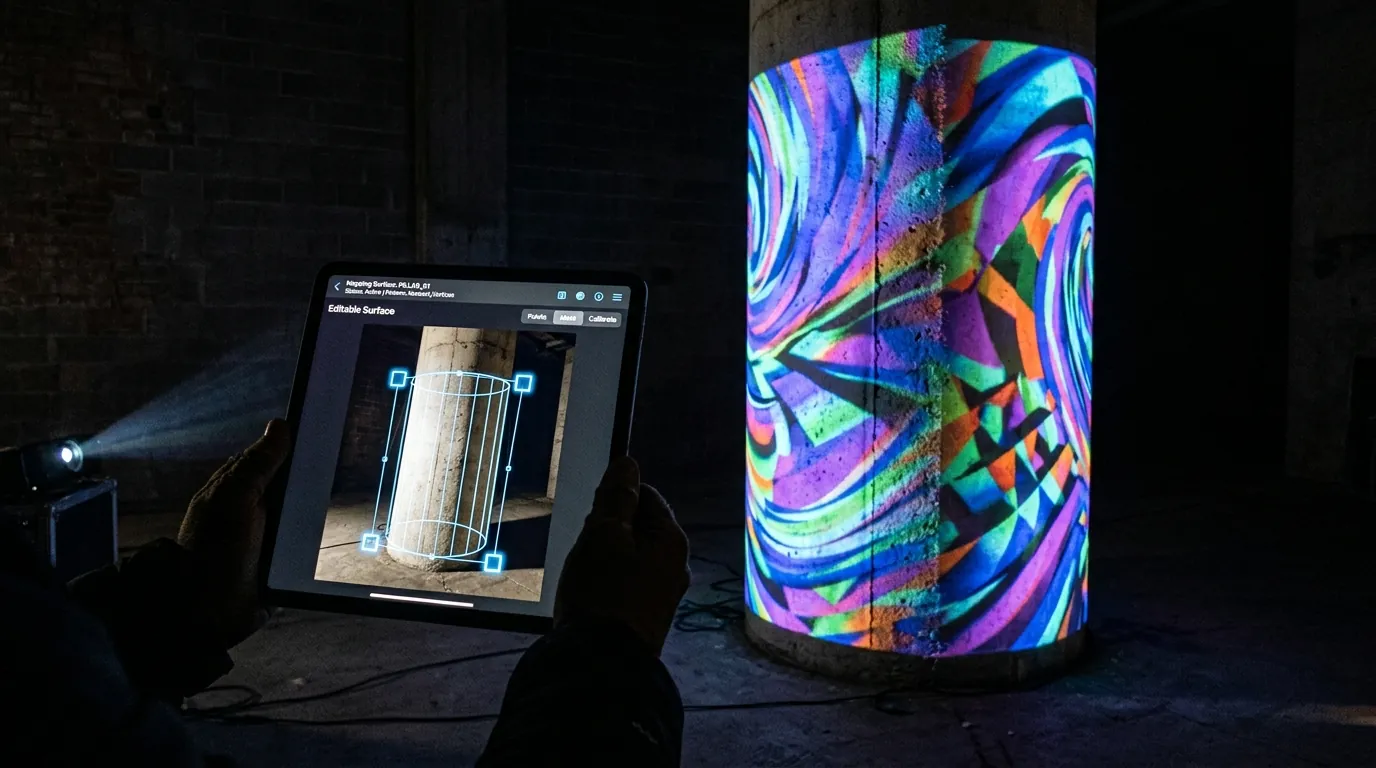
- Warp beyond corner pinning. Four corners on a flat panel is the floor; test on a cylinder. Desktop suites subdivide the image into a mesh grid with draggable interior points, which earns its complexity on compound curves. SurfaBeam keeps a surface's four corners and lets the WARP toggle bend each straight edge into a Bezier curve, pulled by two orange tangent handles that appear when you double-tap a corner.
- Mask what must stay dark. Spill onto the drainpipe and the wall above is what tells an audience they are looking at a projector rather than an object lit from within. Anything outside a surface projects black, so most masking is adding a surface and dragging its four dots to the real edges; Pick Custom Mask goes further, reading an image's light and dark areas to carve the surface into that shape, with a Threshold slider and an Invert toggle.
- Play video reliably for hours. H.264 MP4 and PNG with alpha cover nearly every job. Check the loop point — a black flash you barely notice on a laptop reads as a fault at wall scale. For one clip running continuously across several separate objects, SurfaBeam uses Extended Mask Video on the parent surface first, then Child Video Mask on each of the others.
- Get the picture out of the machine. HDMI from a laptop, USB-C or Lightning HDMI from a phone or tablet, or wirelessly over AirPlay or Cast, which adds latency and leans on venue Wi-Fi. Then count outputs: one projector and four edge-blended projectors are different categories. SurfaBeam matches the projector's resolution automatically rather than asking you to set it by hand.
Where SurfaBeam Fits, and Where It Does Not
SurfaBeam is a single-output cross-platform mapper on Android, iOS and iPadOS, macOS and Windows — where it installs as a direct .exe, from the Microsoft Store, or through Steam. The loop is the same everywhere: add a surface, drag its four corners onto the real object, apply an image or video, project. On top of that sit Bezier edge warping, masking, PNG overlays, hand, body and object tracking, a music visualizer and a Timeline editor. The SurfaBeam user guide documents every panel and gesture.
The places where it is the wrong tool are worth stating plainly. It takes no live texture over Syphon, Spout or NDI, so it cannot receive frames from TouchDesigner or a game engine. It does not speak DMX or Art-Net, so it will not drive lighting fixtures alongside your video. It does not edge-blend multiple projectors — a large facade belongs on a media server with an operator. And one worth spelling out because the name misleads: the music visualizer loads its own audio file and generates one of twelve procedural modes from it. It does not make an imported MP4 react to sound. Footage that has to hit a track must be cut to that track beforehand.
On free versus paid, since "free video mapping software" deserves a straight answer: the free tier is permanently free, not a trial, and includes the full mapping, media, effects, tracking, visualizer and Timeline toolset. It watermarks both the projected image and exported video, and shows an entry gate before mapping. Save, Load and Export are Pro; Capture still image is not gated. Pro is a subscription or a one-time Lifetime purchase on the App Store and Google Play, and a one-time DLC on Steam. There is no cloud sync: with Pro, Save to Files writes a portable Scene_<date>.json that Load from Files reopens on another device, but media are stored as links, so carry the files across too and re-check the alignment. Comparison with other free tiers is in our roundup of free projection mapping software.
Related reading
- Best projection mapping apps 2026 — the categories, tested, with where each one stops.
- Digital mapping: a beginner's guide — the first map, start to finish.
- Projection mapping with a smartphone — what the phone in your pocket can already do.
- MadMapper alternatives — for when the desktop suite is more than the job needs.
Frequently Asked Questions
Is there any difference between video mapping and projection mapping?
No technical difference. Both describe aligning projected imagery to the shape of a real object so the light lands only where you intend. "Projection mapping" dominates in English-language events, architecture and press; "video mapping" is what VJ and club culture kept, and the standard form in several other languages. The only distinction people draw is that "video mapping" implies playing video files, as against tools built around software-generated visuals.
What is video mapping software?
It is projection mapping software under another name. Whatever the label, the job is the same: draw surfaces that match real objects, correct the image so it fits their geometry, mask what must stay dark, play media on each surface, and send the result to a projector. Applications marketed as video mapping software and as projection mapping software are drawn from the same pool.
Is there free video mapping software?
Yes. VPT is free to download, and MapMap and LPMT are free and open source; all three do real mapping on desktop and ask for patience with community-built interfaces in return. SurfaBeam has a permanently free tier with the full toolset, which watermarks the projected image and exported video, shows an entry gate before mapping, and reserves Save, Load and Export for Pro. None of these is a time-limited trial; the trade-off is watermarking and file handling rather than a countdown.
What is beamer mapping?
Beamer mapping is projection mapping, described in German or Dutch. Beamer is the everyday German and Dutch word for a video projector, so Beamer-Mapping or beamermapping is simply the local construction. Every technique and every tool transfers directly; only the hardware vocabulary changes.
Is there a video mapping app for phones and tablets?
Yes, and it is a different way to work rather than a cut-down one: you stand at the surface with the controls in your hand instead of walking back to a laptop between adjustments. SurfaBeam runs the same toolset on Android and iOS as on desktop, with USB-C or Lightning HDMI output as well as AirPlay and Cast. The catch is the projector: a handheld device is only as good as what you can plug it into. More questions like these are answered in our projection mapping FAQ.
Whichever word you searched, the next step is the same
Install SurfaBeam on the machine you already have — macOS, Windows, Android or iOS, with the same toolset on each. The free version is permanently free and includes full mapping, media, effects, tracking, visualizers and the Timeline, so you can map a real object this evening and judge the result for yourself.