What ILW Light Mapper Actually Is
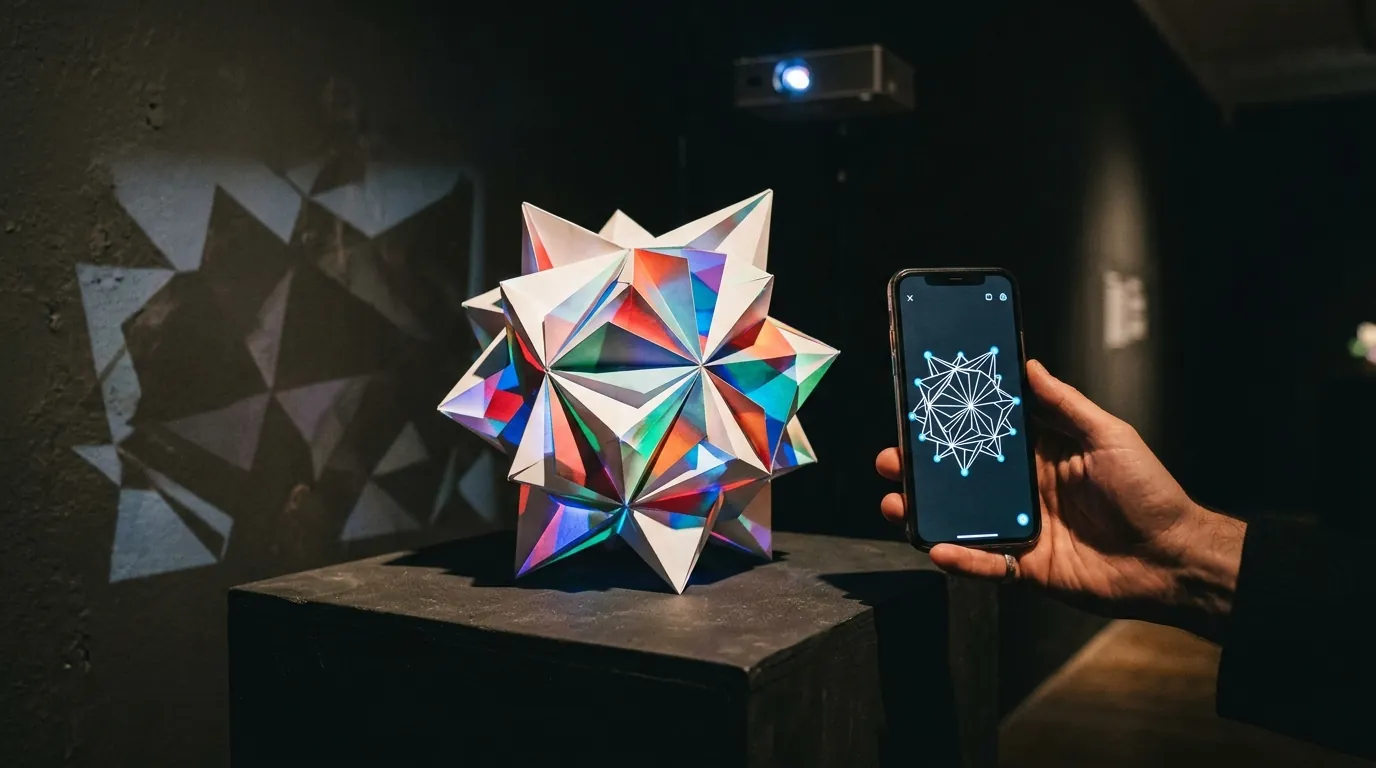
ILW Light Mapper is published on the App Store by Stuart Griese, working under the name Illusive Lightworks — a studio whose own practice is projecting digital art onto handcrafted physical sculptures. That origin explains the shape of the app better than any feature list. It is not a general-purpose show tool that happened to gain a mapping panel; it is the tool a light artist needed for their own pieces, cleaned up and released.
Practically: it is a free download with a handful of optional in-app purchases — two "support development" tiers and a paid artwork pack — none of them required to map anything. Check the listing for current amounts, because they move. It runs on iPhone and iPad from iOS 15 upward, and on Macs with Apple silicon. Ratings are positive but the sample is tiny, so treat the star average as noise rather than evidence.
The workflow it advertises is deliberately short: pick a piece of artwork from the built-in library or import your own H.264 MP4, calibrate the projection onto the object, save the slot. That is the whole loop, and for a sculpture in a gallery or a feature wall at home it is genuinely all you need.
What It Does Well
A comparison that skips this part is an advert. Three things here are better than a free download has any obligation to be.
Alignment that goes past four corners
Four-point corner adjustment is the floor of this craft — it handles a flat rectangle seen off-axis and nothing harder. Light Mapper goes further: multiple grids for setups with several separate targets, a global offset for nudging everything at once after someone bumps the projector, touch scale and rotation, an optional grid overlay, and a warp painting mode that pushes localised distortion into one region rather than moving the whole quad. On a lumpy, faceted object — which is exactly what its author makes — painting a correction where the surface misbehaves is a direct and intuitive way to work.
Worth being precise here, because "warp" covers several unrelated mechanisms. Desktop suites usually subdivide the image into an interior mesh and let you drag the points inside it. SurfaBeam takes a third route: a surface keeps its four corners, and switching WARP on lets you double-tap one to reveal two orange tangent handles — one for each edge meeting at that corner — which pull the straight edges into Bezier curves. Drag the corner itself with WARP on and the whole surface stretches like fabric around it. No one of the three is right in general: painted distortion suits an irregular bulge in the middle of a face, while bowed edges get around a pillar or an arched bay window faster.
Masking and colour control
Warping puts light where you want it; masking keeps it off the window frame, the gutter and the wall behind the object. Light Mapper does additive and subtractive masking from shapes or imported images, plus hue, saturation and brightness, playback speed, transparency, and a colour-key control for dropping a flat background out of a clip. Spill onto the surround is the single clearest tell that an audience is looking at a projector rather than a lit object, so a cheap app taking masking seriously matters more than the feature list makes it sound.
Save slots, with no gate on them
Multiple save slots, with project management around them, so the alignment comes back as you left it. This is the quiet advantage and we should say so plainly: SurfaBeam's free tier does not do this — saving and loading project files sit behind Pro. If your requirement is "align my sculpture once and reopen it every evening for a month without paying a subscription", Light Mapper meets it and our free version does not.
When You Actually Need an Alternative
Five situations. If none of them describes you, do not switch — you would be trading a tool that fits for one that is merely bigger.
- The device in your hand is not Apple. This is the one almost everybody hits. Light Mapper is iPhone, iPad and Apple silicon Mac only. There is no Android build and no Windows build, so if the machine that will run the show is a Pixel, a Galaxy tablet or the venue's Windows laptop, the app is out of scope before any feature comparison starts.
- The show has to be timed. Scrubbing a clip's timeline is not the same as sequencing a show — cueing several surfaces to change at fixed points against a soundtrack needs tracks and clips, not a scrub bar.
- You want the projection to react. To a song, or to a person walking into the beam. Nothing in Light Mapper's published feature set covers audio-driven visuals or camera-based tracking, and those are a different engine rather than a missing checkbox.
- The alignment has to survive a handover. If a colleague on other hardware has to take over the rig, a single-platform tool becomes an organisational problem rather than a technical one.
- You are mapping several objects that share one continuous image. Multiple independent grids cover several separate targets well. One video flowing across three props as though they were one screen is a different feature.
"Light Mapping Software" Means Two Different Things
Before you spend an evening on the wrong download, sort out which category you are in — the phrase is used for both, and search results blend them.
The first is projection mapping: a projector throws light onto a physical object and software bends the image until it fits the geometry. Every app on this page does that. The second is pixel mapping for addressable LED strings — software that decides which bulb on a roofline turns which colour, driving physical fixtures rather than a projector. The test takes two seconds: if your output plugs into an HDMI port, you want a projection mapping app; if it plugs into a light controller, you want pixel-mapping software and nothing here will help you. Our beginner's guide to digital mapping walks through the projector side from scratch if this is your first install.
Need it on Android or Windows?
SurfaBeam runs the same mapping, warping, masking, tracking and effects toolset on Android, iOS, macOS and Windows. The free tier is permanently free and includes the whole toolset, so you can judge the warp and the mask edges on your own object before spending anything. All the routes are on the download page.
The Alternatives Worth Knowing
Four names cover the realistic field for anyone leaving an Apple-only mapper, plus the desktop tier if the work is bigger than a handheld app.
SurfaBeam
Full disclosure: this is our app, so weigh it accordingly and test it rather than taking our word. It exists in this comparison for one reason above all — platform coverage. It runs on Android, iOS and iPadOS, macOS and Windows, and on Windows there are three routes in: a direct .exe installer, the Microsoft Store, and Steam, where Pro is a one-time DLC instead of a subscription. The three are compared in our Windows guide.
Optoma Projection Mapper
A paid one-time purchase on Android, iOS and Amazon Fire tablets, and it works with any projector rather than only Optoma hardware. It is built around rectangle primitives whose sides bend into curves — better than a plain keystone, and fine for a garage door or a gently arched opening. The limits show on irregular geometry, where one fixed curve per side runs out of adjustment, and on spill: the shapes you draw are the only thing defining the lit area, with no separate masking tools behind them. For a first install on a flat surface it remains a sensible small purchase; our Optoma Projection Mapper alternatives page goes deeper.
Lazy Lighting
A phone and tablet app on both iOS and Android, free to download with paid tiers, and the closest thing to Light Mapper in spirit — drawing-led, aimed at generated visuals more than at imported video, and pleasant to run live. If you liked Light Mapper's approach and simply need it to exist on Android, this is the first thing to try. Our Lazy Lighting alternatives piece covers that corner in detail.
Desktop suites, and the free end
If the job has grown to several blended projectors, live texture input from another application, or DMX-controlled lighting fixtures on the same clock as the video, no handheld app in this category will do — that is MadMapper, Resolume Arena, HeavyM or TouchDesigner territory, and a large facade belongs on a media server with an operator regardless. At the opposite end, VPT, MapMap and LPMT cost nothing on desktop and charge you in setup time and self-support instead; our guide to free projection mapping software weighs those against the free tiers of commercial apps.
Light Mapper vs the Alternatives, at a Glance
| App | Runs on | Where it is strongest | Cost model |
|---|---|---|---|
| ILW Light Mapper | iPhone, iPad, Apple silicon Mac | Sculptures and static objects; warp painting; free save slots | Free download with small in-app purchases |
| Lazy Lighting | iOS, Android | Drawing-led generated visuals, running a room live | Free download with paid tiers |
| Optoma Projection Mapper | Android, iOS, Amazon Fire | Flat and gently arched surfaces, cheapest way in | Paid one-time purchase |
| SurfaBeam | Android, iOS, macOS, Windows | Cross-platform work, curved surfaces, tracking, timed shows | Permanently free tier; Pro as subscription or one-time Lifetime, one-time DLC on Steam |
| Desktop suites | Windows, macOS | Multi-projector blending, live texture input, DMX fixtures | Paid licences — check each vendor's own pricing |
Prices and licence terms move, so treat the last column as a shape rather than a quote. The wider map of these categories, including how the desktop tier compares, is in our pillar guide to the best projection mapping apps for 2026.
Where SurfaBeam Fits — and Where It Does Not
The mapping core will feel familiar if you have used Light Mapper. You add a surface, drag its four corner dots onto the real corners of the object, then flip on Video Select Mode, tap the surface and apply an image or a video to it. Anything outside a surface projects black — masking's blunt and most useful form — and a Pick Custom Mask tool cuts a surface to the light and dark of an image you choose, with a Threshold slider and an Invert toggle to tune the stencil live. Dragged corners snap magnetically onto a neighbour's corner, so adjacent panels meet cleanly instead of leaving a hairline of wall showing between them.
Past that, three things go where a calibrate-and-play app stops. Live tracking watches hands, a body or a physical object through a camera so effects collide with whatever moves, and an Auto-Calibrate scan gets the projection and the camera agreeing on the same space. The Timeline editor sequences clips on tracks for a show cued to a soundtrack rather than a loop. And the music visualizer loads its own audio file and generates one of twelve procedural modes from it — its own visuals, built live from the track you feed it, rather than an imported MP4 made to pulse along. The SurfaBeam user guide documents every panel and gesture with screenshots.
Moving a scene between machines is manual, but it is possible. There is no cloud sync; instead, Pro's Save to Files writes a portable Scene_<date>.json that Load from Files reopens on another device. The file stores links to your media rather than the media itself, so carry the videos across too — and re-check the alignment, because a map calibrated from one projector position is not valid from another.
The honest costs. The free tier is permanently free and includes the whole toolset, but it puts a watermark on both the projected image and exported video, and shows an entry gate before mapping. Saving, loading and video export are Pro; capturing a still photo of the projection is not gated. There is no Syphon or Spout input, no DMX or Art-Net, and no multi-projector edge blending. Output resolution matches the projector automatically — one less thing to set, and also one less thing to override. And if you are entirely on Apple hardware, projecting a looping clip onto one sculpture, Light Mapper's free save slots make it the cheaper answer. Our iPhone and iPad guide and the Android guide cover the output side on each platform.
A Thirty-Minute Test Before You Commit
Do this on a quiet evening with a projector, the object you actually care about, and no one waiting. It tells you more than any comparison table, this one included.
- Place and lock the projector as near perpendicular to the object as the room allows. Every result below is relative to that position, so moving it invalidates the test.
- Corner pin a still image first. If the corners will not sit exactly on the object's edges, nothing after this matters.
- Then put the hard surface in front of it — a pillar, a bin, a rolled sheet of card, whatever curve your real job has — and use the tool's actual warp, not its corner handles. Watch whether the image stays stable while you adjust it, not just where it ends up.
- Mask something out. Keep light off one region that must stay dark, and judge the edge from three metres away rather than on the preview screen.
- Loop a two-minute clip for twenty minutes. A one-frame black flash you would never notice on a phone reads as a fault at wall scale.
- Close the app and reopen it. Does your alignment come back exactly, and is that free or paid? This is where the tools in this comparison differ most.
- Change one thing with the projector already lit, the way you will have to at a venue with people watching. Tools vary enormously here and it never shows up in a feature list.
If the projector itself is the weak link rather than the software, our guide to choosing a projector for projection mapping covers brightness, throw ratio and the mounting decisions that make or break a result.
Related reading
- Best projection mapping apps 2026 — the four categories and how to choose between them.
- Lazy Lighting alternatives — the closest neighbour to this comparison.
- The best projection mapping app for Android — if Apple-only was your blocker.
- Projection mapping with a smartphone — cables, adapters and what a phone can realistically drive.
Frequently Asked Questions
What is the ILW Light Mapper app?
It is a projection mapping app for iPhone, iPad and Apple silicon Macs, published by Stuart Griese under the Illusive Lightworks name. You pick artwork from its built-in library or import your own H.264 MP4, calibrate the image onto a physical object using corner adjustment, grids and warp painting, then save the setup to a slot. It is free to download with a few small in-app purchases.
Is there a Light Mapper app for Android?
Not ILW Light Mapper itself — it is published for Apple platforms only. On Android the realistic options are Lazy Lighting, Optoma Projection Mapper and SurfaBeam, and only the last of those also runs on Windows and macOS if you need the same tool across a mixed set of devices.
Is there light mapping software for Windows?
Yes, in two tiers. At the desktop end, MadMapper, Resolume Arena, HeavyM and TouchDesigner all run on Windows and go far beyond a handheld app, at desktop-suite prices. In the lighter tier, SurfaBeam installs on Windows three ways — a direct .exe, the Microsoft Store, or Steam — and keeps the same toolset you would use on a phone. VPT, MapMap and LPMT are the long-standing free options if the budget is zero.
Is ILW Light Mapper free?
It is free to download, with optional in-app purchases covering a content pack and a couple of tiers that support development. Its saving and loading are not paywalled, which is a genuine advantage over several apps in this category, including SurfaBeam's free tier — ours includes the whole mapping, media, effects, tracking, visualizer and Timeline toolset but watermarks the projected and exported image, shows an entry gate before mapping, and reserves Save, Load and Export for Pro.
Is light mapping the same as projection mapping?
When an app calls itself a light mapper, yes — it means projection mapping: aligning video or images to a real surface with a projector. The confusion comes from a separate field that borrows the same phrase, where the software assigns colours to addressable LED pixels for Christmas roofline displays and drives physical bulbs instead. Sorting out which one you are shopping for takes a glance at what the output plugs into, as covered further up this page.
More questions of this kind are answered in our projection mapping FAQ, and new tutorials are posted regularly on the SurfaBeam blog.
Map your hardest surface first, then decide
Install SurfaBeam on whatever you already own — Android, iOS, macOS or Windows — and run the warp and mask test on the object your real job involves. The free tier is permanently free and includes the full mapping, media, effects, tracking, visualizer and Timeline toolset, so you can judge the result before spending anything.