Before You Pick One: What Actually Decides the Result
Four things separate a projection that looks like an illusion from one that looks like a projector pointed at a wall, and none of them is the idea itself.
- Darkness beats brightness. Turning off one lamp does more for contrast than a thousand extra lumens. What you can get away with at each brightness level is covered in can any projector do projection mapping.
- The surface is half the content. Pale, matte and reasonably flat gives you the most. Red brick, dark wood and glossy paint eat the picture and are harder than they look in other people's photos.
- Getting the picture out of the device. A cable is steadier than anything wireless, though AirPlay and Chromecast are fine for a low-stakes evening — see the AirPlay setup guide and projection mapping with a smartphone.
- Saving is a Pro feature. The free version builds, projects and plays everything here, but it will not save a project or export a video, and a watermark sits on the projected image and on exports. So on free, plan to build and run an idea in one sitting. Capturing a still photo of the projection is not Pro-gated.
If you have never mapped anything, do the ten-minute version first — digital mapping for beginners walks through the loop every idea below is a variation of: add a surface, drag its four corners onto the real object, apply media.
Five You Can Do Tonight
One projector, one surface, no building, no shopping. Fifteen to forty minutes each, start to finish.
1. Put a window in a wall that has no window
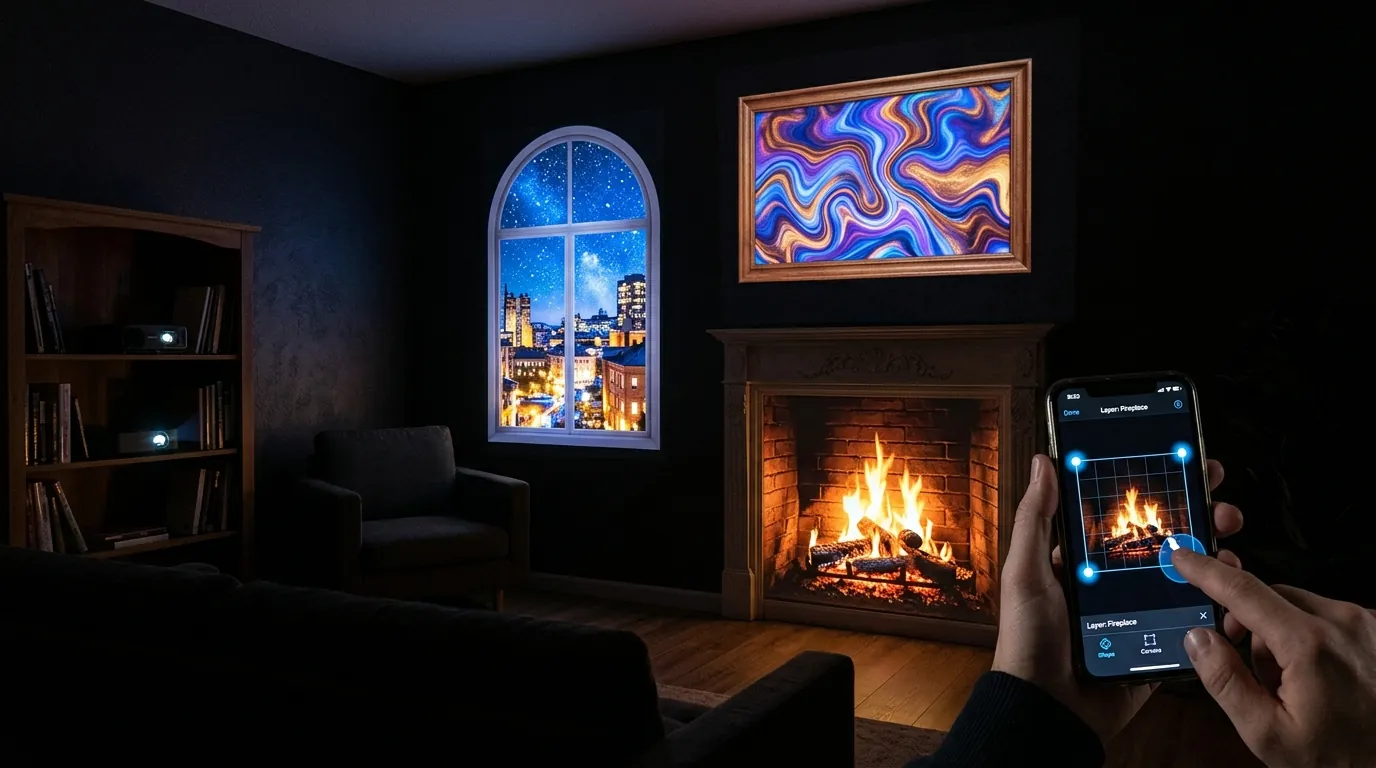
Map a rectangle on a blank wall and fill it with a slow view: rain on glass, snow falling, a city at night. Because everything outside a mapped surface projects black, the result is not a bright rectangle floating on paint — it is a hole in the wall. Tape out the shape first, then drag the four corner dots onto the tape, at roughly head height. What ruins it is a fast-cut clip; a real window barely changes.
2. Fill an empty picture frame
Hang an empty frame — no glass, no backing, or a plain white card inside — and map the opening. A painting that moves inside a real frame is one of the most convincing things you can do in twenty minutes: the frame supplies the depth cue, and the projection only has to fill a small, well-defined area, so it survives a room that is not fully dark. Scaled up with a personal photo or a message it becomes a surprise for someone, which is what the Valentine's projection walkthrough builds out.
3. A fire in a fireplace that has no fire
An unused fireplace opening, a stove with its door open, or a cardboard box on its side with a log in front. Map the opening, drop in a fire loop, and it reads far better than a fire video on a television because the light comes from a real recess in a real wall. If the opening is arched rather than square, this is your first honest reason to turn on WARP: it bends each straight edge of the surface into a curve, pulled by two orange tangent handles that appear when you double-tap a corner.
4. A reactive wall for a party
The music visualizer generates its own animation from an audio file you load into it — fluid water, a spiral galaxy, a fire tornado, particle swarms, twelve modes in all — and paints it across the wall while that track plays. Be clear about the limit: it visualizes the track you hand it, so it works when the app is the thing playing the music. It will not make a DJ's set, or an MP4 you imported onto a surface, react to sound. Pick a mode, set size and flow speed, and leave it running. Lowest effort here, and reliably the one people ask about.
5. Bouncing balls down a real staircase
Map each step as its own surface, then turn on the bouncing-ball physics: the balls fall and bounce off every surface you have mapped, which means they bounce down your actual stairs. Sliders control bounciness, gravity, ball size and how many exist at once, and you can skin the balls with an image. Ten minutes, and no content needed. The same trick works on a bookshelf or a stack of boxes.
Everything above works on the free version
SurfaBeam runs on Android, iOS, macOS and Windows with the same mapping, warping, masking, tracking and effects toolset on each. The free tier is permanently free and includes the full toolset — it watermarks the projected image and exported video, shows an entry gate before mapping, and reserves saving, loading and video export for Pro.
Six Worth a Saturday
These need content you have to find or make, some physical setup, or an alignment pass you cannot rush. Half a day each, and they are the ones people photograph.
6. Singing pumpkins
Four faces singing in sequence on four real pumpkins is one of the most-attempted mapping projects there is, and the reason so many attempts look wrong is not the software — it is that the pumpkins are not where the content assumes they are. You buy or download a video of singing faces, then arrange the pumpkins to match the faces rather than the other way round, mapping one surface per face. Budget most of your time for alignment and for stopping them rolling. The method is in singing pumpkins: how to set up and align them, and the wider home-haunt version — window silhouettes, a lit porch, a doorway — is in the Halloween home haunt guide.
7. The garage door Christmas scene
A garage door is the best beginner exterior: large, flat, usually pale, facing the street, with a clean rectangular boundary to map to. One projector on a table or tripod in the driveway, one surface pinned to the door edges, one seasonal loop. The hard parts are outdoors rather than in software: where the projector lives, what happens if it rains, how far back you can get before the pavement runs out. The one-projector garage door guide covers throw distance, weatherproofing and running it unattended for a month.
8. A shop window people stop for
Rear-project onto tracing paper or frosted film taped inside the glass, with the projector behind the display and out of sight, and you have a window that glows at eleven at night with nobody minding it. The hardest constraint is depth: a shallow window demands a short-throw projector, and that is where the budget goes. Streetlight spill sets a floor on how bright you need to be. If it is a commercial job rather than a hobby, store window projection mapping under $500 lists what a working setup costs.
9. Wrap a column, a bin or a cardboard tube
This is the exercise, not the show. Stand a cylinder in front of the projector — a pillar, a kitchen bin, a rolled sheet of card — and get an image to sit on it without the edges creeping off the sides. Corner pinning cannot do it; you need WARP, which turns each of the surface's four straight edges into a Bezier curve. Double-tap a corner to reveal its two orange tangent handles, drag them until the edge follows the object's silhouette, then repeat around the shape. Half an hour on a cylinder teaches you more than a week of videos, and it is the test to run on any mapping tool before trusting it with a paid job. The gestures are in the SurfaBeam user guide.
10. One video flowing across three separate objects
Three canvases on a wall, three boxes on a plinth, or three panels of a fence — and a single clip that appears to travel across all of them, with the gaps between staying dark. It is what makes a scene look designed rather than assembled. The workflow is specific: mark the big background surface as the parent with Extended Mask Video first, then mark each other surface as a Child Video Mask so each shows its own slice of that single clip. Order matters; doing the children first does not work. Anything with slow horizontal motion sells it best.
11. Cut the light to the shape of a logo
A band name on a stage backdrop, a company mark in a foyer, a snowflake on a wall. Rather than dragging corners into an irregular outline, hand the app an image and let it carve the surface using that image's light and dark areas, with a Threshold slider to tune where the cut falls and an Invert toggle to swap which side survives. A high-contrast black-and-white PNG works best. Do not confuse it with a PNG overlay, which layers a transparent image on top of a playing video: the overlay adds a border or a logo over moving content, the custom mask makes the shape itself the light.
Four That Are Properly Projects
A weekend minimum, hardware or people involved, and a real chance of not working first time. Read the last one before you commit to anything.
12. Project video into a person
Point a camera at someone standing in the projector beam, run body tracking with segmentation so the app cuts a filled silhouette rather than a stick figure, mark that silhouette as a media target, then apply a video into it. Fire, water, stars — inside the outline of a person, moving as they move, with the wall behind them dark. The most striking effect here, and the most conditional: it needs a device that passes the built-in performance check for body segmentation, a camera that sees the whole person, and a calibration pass so the projection and the camera agree about where things are. Rehearse it before anyone is watching.
13. An interactive corner people can play with
A wall where vines grow from your fingertips, a swarm of particles that chases your hand, a galaxy of stars you can pinch and tilt, a water jet that fires while your hand is open. Picking one from the effects list starts the camera and the tracking it needs automatically. The work is physical: the camera has to see the interaction zone, the projector must not blind whoever stands in it, and one calibration pass makes effects land where hands actually are rather than thirty centimetres to the left. Recalibrate whenever the projector, camera or surface moves. Set it up at the edge of a party and it runs itself all night.
14. A sequenced five-minute show
Everything above is a loop. This is a piece with a beginning and an end: surfaces lighting in order, clips cutting on a beat, text appearing, a physics burst as punctuation, then blackout. The Timeline gives you one track per surface, clips you trim and split against a playhead, speed changes and text clips — where an idea stops being a demo and becomes something you can perform twice the same way. Building and playing a Timeline is free; rendering it out as a single video file is Pro. Most of the effort goes into content rather than sequencing, and where to get projection mapping content covers buying, finding and making it.
15. A whole house or building facade — and why to think twice
This is the one everyone wants, and the honest answer is that the version in the videos you have seen is a multi-projector, high-lumen, media-server job with a team and a road closure. What is achievable alone is a slice of it: one wall, one gable end, a garage door, a courtyard feature — lit properly with a single projector, from a position you can physically get to, on a surface pale enough to hold contrast. That reads far better than a whole house lit dimly and unevenly. Building and facade projection mapping draws the line between what one person can do and what needs a crew, before you spend money finding out.
Which One to Start With
If you have never done this: idea 5, the bouncing balls on a staircase. Ten minutes, no content, and it teaches the core loop faster than any tutorial, because the physics makes every misalignment instantly obvious.
If you have a deadline or a holiday: pick the seasonal idea that matches and start two weekends early. The software part is an evening; the physical part — where the projector stands, whether the extension cable reaches, whether it rains — is what runs late.
If you are working out whether to buy anything: do ideas 9 and 11 first, on a cylinder and on a logo. Warp quality and mask edges separate a real mapping tool from a video player with a keystone slider, and neither shows up in a feature list. Our comparison of the best projection mapping software for 2026 covers where each category stops, and the download page has SurfaBeam for Android, iOS, macOS and Windows.
Related reading
- Digital mapping for beginners — your first map in ten minutes.
- Free projection mapping software — what you really get without paying.
- 3D projection mapping, how it actually works — before you try to map a sculpture.
- Projection mapping on iPhone and iPad — output options if the device is the show machine.
The questions that come up on all of these — throw distance, washed-out images, whether a phone is enough — are answered in the projection mapping FAQ, and new walkthroughs go up on the SurfaBeam blog.
Pick one and do it this weekend
Install SurfaBeam on whatever you have — a phone, a tablet, a laptop — and try the staircase or the empty picture frame tonight. The free version is permanently free and includes the full mapping, media, effects, tracking, visualizer and Timeline toolset, with a watermark on the projected image and on exports, so you can judge every idea on this page before spending anything.